


How to Generate Complex Class Diagrams Using Visual Paradigm’s AI UML Generator
Class diagrams are the backbone of object-oriented design, but creating complex ones manually—complete with inheritance hierarchies, associations, multiplicities, attributes, operations, interfaces, and packages—can take hours of tedious work. Visual Paradigm’s AI UML generator makes this fast and accurate: describe your domain or system structure in natural language, and it produces a detailed, well-organized class diagram instantly.
This tutorial focuses on intermediate-to-advanced users who need robust class diagrams (e.g., for enterprise applications, domain-driven design, or legacy system refactoring). We’ll build a complex example step-by-step: an **online bookstore system** with products, orders, users, payments, inventory, and related entities. By the end, you’ll know how to prompt effectively for complexity, refine outputs, and leverage Visual Paradigm’s ecosystem for professional results.
Prerequisites & Best Setup for Complex Diagrams
For detailed class modeling, we recommend:
- VP Desktop – Offers the most precise editing, validation, and advanced UML features (recommended for final polishing).
- AI Visual Modeling Chatbot
- Web Apps – Great for initial generation and quick iterations:
In this tutorial, let’s try with Visual Paradigm’s AI Chatbot.
Step 1: Craft a Strong, Detailed Prompt
Complex class diagrams need richer prompts. Include:
- Main entities and their attributes/operations
- Relationships (association, aggregation, composition, inheritance)
- Multiplicities and roles
- Interfaces, abstract classes, packages
- Constraints or notes (e.g., business rules)
Example prompt for our online bookstore:
“Generate a detailed class diagram for an online bookstore system. Core entities:
– Customer (id, name, email, password, addresses: list of Address, paymentMethods: list of PaymentMethod, orders: list of Order)
– Order (id, orderDate, status, totalAmount, customer: Customer, lineItems: list of OrderItem, shippingAddress: Address, payment: Payment)
– OrderItem (quantity, subtotal, product: Product)
– Product (id, title, author, isbn, price, stockQuantity, description, categories: list of Category)
– Category (id, name, parentCategory: Category)
– Payment (id, amount, paymentDate, method: PaymentMethod, status)
– PaymentMethod (abstract, type, details)
– CreditCardPayment extends PaymentMethod (cardNumber, expiry, cvv)
– PayPalPayment extends PaymentMethod (paypalEmail)
– Address (street, city, state, zip, country)
Relationships: Order has many OrderItems (composition), Customer places many Orders (association 1..*), Product belongs to many Categories (many-to-many), Inventory tracks Product stock (separate Inventory class if needed). Use packages: UserManagement, Catalog, Ordering, Payment. Include key operations like placeOrder(), calculateTotal(), updateStock().”
Send this to the AI (in Chatbot: paste directly; in Web Apps: select “Class Diagram” → “Generate from Text”).

Step 2: Generate and Initial Review
The AI will produce:
- Classes with attributes (typed where possible) and operations
- Inheritance arrows (generalization) for PaymentMethod subtypes
- Associations with multiplicities (1..*, 0..1, etc.) and roles
- Aggregation/composition symbols where logical
- Package grouping for organization
- Automatic layout (hierarchical or layered for readability)
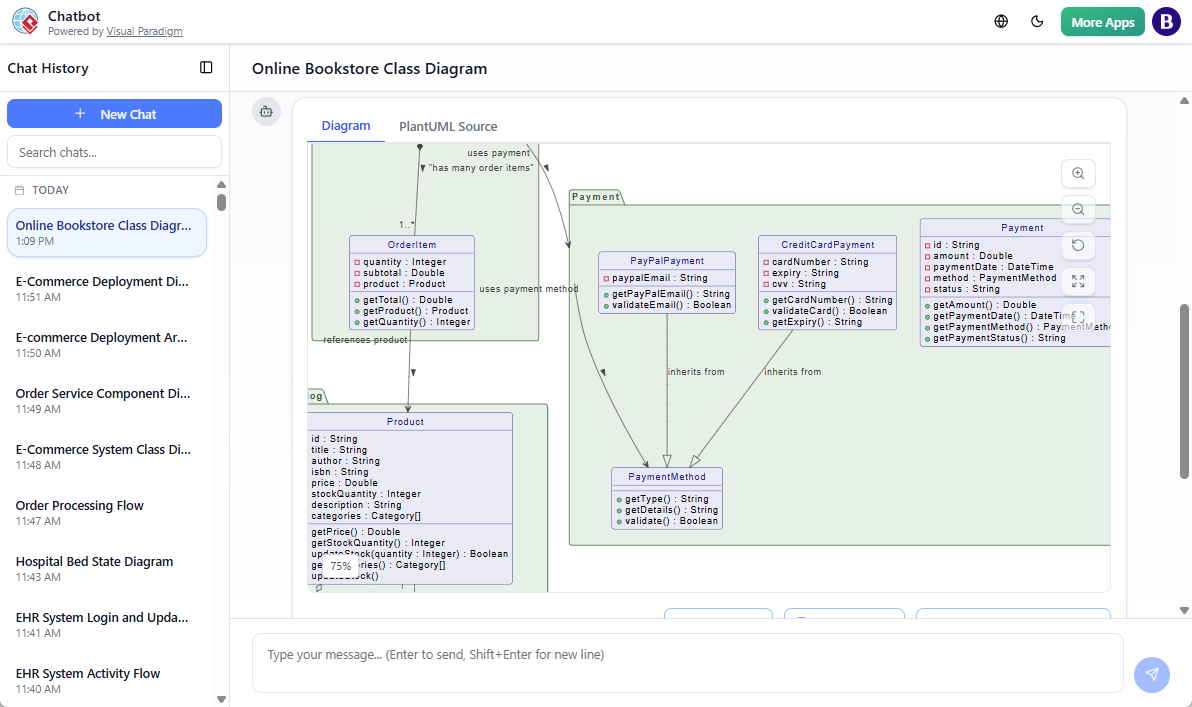
Check immediately:
- Are key relationships correct?
- Multiplicities logical?
- Any missing attributes/operations?
Step 3: Iterate and Refine with Follow-Ups
Refinement is where the power shines—use conversational adjustments:
- “Add Discount class that applies to Order, with percentage and conditions.”
- “Make Category hierarchical with self-association for subcategories.”
- “Show Order status as an enumeration: Pending, Processing, Shipped, Delivered, Cancelled.”
- “Add constraints: stockQuantity >= 0, totalAmount > 0.”
- “Regenerate with better layout: group by packages vertically.”
In Chatbot: just reply naturally. In Web Apps: edit prompt and regenerate, or switch to manual edit mode.
Pro Tips for Complex Class Diagrams with Visual Paradigm
- Break very large systems into multiple prompts (e.g., one for core domain, one for payment subsystem), then merge in Desktop
- Use domain-driven design language in prompts (entities, value objects, aggregates) for better structure
- Specify visibility (public/private) and types (e.g., String, BigDecimal) for realistic models
- Ask for patterns: “Apply Repository pattern for data access” or “Show DTOs for API layer”
- Iterate in small steps—add one layer of complexity at a time
For seamless workflow across generation, editing, and documentation: Visual Paradigm AI Diagram Generator Ecosystem.
You’re Now Ready for Complex Modeling
You’ve gone from a detailed text description to a sophisticated class diagram—complete with inheritance, relationships, packages, and business logic—in far less time than manual methods. Visual Paradigm’s AI handles the structure so you focus on design decisions.
Challenge yourself: try prompting for your own domain (e.g., a banking system, inventory app, or SaaS backend). Share what you built or any tricky part in the comments—I’m here to help refine your prompts!

 English
 Arabic
 Chinese (Simplified)
 Dutch
Dutch French
 German
 Italian
 Portuguese
 Russian
 Spanish